


Logitech MX Master 4 Review revealing the unexpected weakness users find

If you’ve ever tried to work on a cramped, noisy, too-light mouse for an entire day, you already know the feeling: your hand starts complaining long before your brain does. That’s exactly the space the Logitech MX Master series has always dominated. It’s the mouse people recommend when someone says they want the best mouse for productivity, and for good reason.
The Logitech MX Master 4 doesn’t just continue that story. It tweaks it, polishes it, and in a few places, complicates it. On paper, it looks like a smarter, tougher, more refined version of an already famous productivity mouse. In real use, that mostly holds true. But there’s also a catch: the more Logitech tries to turn it into a high-end workflow machine, the more you feel the software side of the experience. And that’s where it stops being a simple “just plug it in and forget it” kind of device.
Quick Highlights
- Excellent for long work sessions and creative tasks
- Haptic feedback and Actions Ring add real workflow shortcuts
- Heavier feel makes it stable, not ideal for gaming
- Logi Options+ unlocks the best features, but setup takes time
- Battery life is still ridiculously good
So, is it worth the money? If you’re a power user, creative professional, or someone who lives inside Excel, Photoshop, Premiere Pro, or multiple devices at once, this mouse makes a lot of sense. If you want a lightweight gaming mouse or a bare-minimum office mouse, it may feel like overkill. And honestly, that’s kind of the point. The MX Master 4 isn’t trying to be everyone’s mouse anymore. It’s trying to be the right person’s mouse.
Specs at a glance
| Spec | Logitech MX Master 4 |
|---|---|
| Price | ~$119 in the US / ₹12,995 in India |
| Weight | ~150g |
| Sensor | Darkfield high-precision laser, up to 8,000 DPI |
| Battery life | Up to 70 days with USB-C fast charging |
| Connectivity | Bluetooth or Logi Bolt USB receiver |
The interesting thing about the MX Master 4 is that it doesn’t feel like a dramatic reinvention. It feels more like Logitech looked at the MX Master 3S and said, “Okay, what if we made this tougher, smarter, and slightly more ambitious?” That’s why this review ends up being less about flashy first impressions and more about how the mouse behaves after a month of actual work. Because with a device like this, the real test isn’t whether it looks premium. It’s whether it quietly disappears into your workflow and makes the day easier.
Design and build: familiar, but more grown up
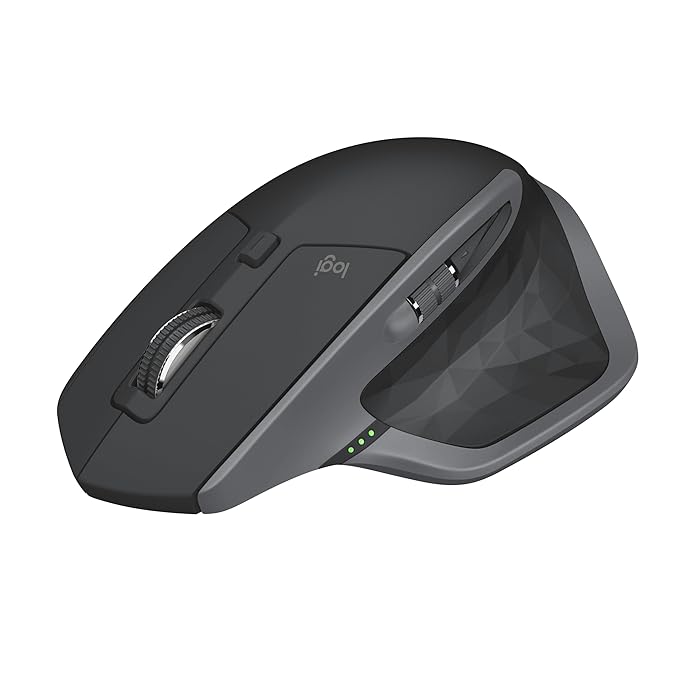
The Logitech MX Master 4 keeps the signature MX Master shape, and that’s a very good thing if your hand likes a large, sculpted mouse. It’s clearly designed for a right-handed palm grip. You don’t pinch it. You rest into it. For long office sessions, that makes a real difference. Your hand feels supported instead of perched on top of a tiny shell.
But there’s no hiding the weight. At around 150 grams, this is not a mouse that likes to be flung around. It feels planted. Stable. Almost reassuringly heavy. That’s great when you’re editing photos, scrubbing through a timeline, or making tiny spreadsheet selections. It’s less great if you’re used to quick wrist flicks or you want something feather-light for fast gaming movements.
Logitech also made an important material change here. The old soft-touch coating that could get sticky or peel over time is gone. In its place, you get textured hard plastic and denser grip material. It’s not as soft to the touch, but it’s much more practical. That might sound boring, but it’s the kind of boring that matters after a year of use.
The metal scroll wheels still feel excellent. The main MagSpeed wheel is one of the best productivity features Logitech has ever made. It can scroll in precise notched steps when you need control, and then switch into free-spin mode when you need speed. If you’ve ever flown through a huge document or a long spreadsheet, you know how satisfying that is. It’s one of those features you miss the moment you go back to a regular mouse.
Build quality is solid too. No flex, no rattles, no cheap feeling seams. And surprisingly, this mouse is easier to repair than you might expect. The screws are visible, the battery can be swapped more cleanly, and Logitech seems to have thought a bit more about longevity. That’s refreshing. A premium mouse should feel premium, sure, but it should also feel like something you can live with for years, not just admire on day one.
Then there’s the new haptic feedback. This is one of the headline upgrades, and it’s interesting, even if it’s not always essential. The mouse gives a subtle buzz in certain moments, like hitting the end of a scroll or snapping to a grid. Sometimes it feels genuinely useful. Sometimes it feels like the mouse wants to make sure you’re paying attention. It’s clever, but not magical. Whether you love it or barely notice it will depend on how much you customize it.
Setup and software: easy to connect, not always easy to master
Setting up the MX Master 4 is weirdly two-sided. On one side, it’s refreshingly simple. Turn it on, and it wakes with a small haptic pulse. Use Bluetooth or the Logi Bolt receiver and you’re connected in seconds. That part is smooth, fast, and exactly what you’d expect from a premium accessory in 2026.
But then comes Logi Options+, and this is where the mouse becomes more demanding. Not difficult, exactly. Just detailed. If you want the best version of the MX Master 4, you’ll need to spend some time learning how to customize buttons, tweak haptic responses, set up app-specific shortcuts, and make the new Actions Ring actually useful.
And that’s the thing: the mouse is good out of the box, but it’s much better once you’ve set it up for your workflow. For power users, that’s exciting. For someone who just wants to plug in a mouse and get back to work, it may feel like a bit much. There’s a small but real gap between “connected” and “fully useful.”
Think of it like a kitchen tool with ten smart functions. You don’t need all of them. But once you learn the ones that fit your habits, you start wondering how you managed without them. That’s the MX Master 4 in a nutshell.
Daily performance: where this mouse really earns its name
This is where the Logitech MX Master 4 makes its case very clearly. For productivity, it’s excellent. Not just good. Excellent.
The MagSpeed wheel still steals the show. It’s fast when you need speed and precise when you need control, which is exactly why so many people swear by this series. Side scrolling with the thumb wheel also feels natural, especially in Excel or while working on video timelines. It’s one of those details that doesn’t sound exciting until you’ve used it for a week and then suddenly every other mouse feels a little clumsy.
Multi-device switching is another strength. You can pair up to three devices and jump between them with a single button. If you move between a MacBook, Windows desktop, and tablet during the day, this saves more time than you’d think. It’s the sort of small convenience that quietly lowers friction, and that’s a big deal in a busy setup.
The sensor is also very capable. The Darkfield laser sensor goes up to 8,000 DPI and works on a wide range of surfaces, including glass. In real-world use, cursor tracking is dependable and accurate. For normal office and creative work, it feels reliable in the way a good tool should. You don’t sit there thinking about the sensor. You just move the pointer and it goes where it should.
That said, there’s a trade-off. On a high-refresh monitor, the mouse doesn’t always feel as instantly responsive as the display around it. It’s not a dealbreaker. But it is a reminder that Logitech has tuned this more for battery life and comfort than raw speed. That’s fine for productivity. It’s not ideal for gaming or anyone who lives by ultra-fast flicks and high polling rates.
Clicks are another quiet win. They’re soft, consistent, and much less noisy than many alternatives. If you work in an office, share space with others, or just hate clicky chaos, that matters more than people admit.
Comfort is still one of the biggest reasons to buy this mouse. Long sessions feel easier because the shape supports the hand so well. But the weight again becomes the line between strength and limitation. For detailed work, it’s stable. For fast movement, it can feel like you’re dragging a luxury sedan instead of driving a sports car.
Battery life: still ridiculous, in a good way
Battery life is one of those categories that shouldn’t be exciting, but somehow Logitech keeps making it worth mentioning. The MX Master 4 lasts a long time. In a month of daily use, it barely needed charging. And when it does need a top-up, USB-C fast charging is here to save the day. A short charge can get you hours of use, which means you’re not stuck babysitting it like some fussy wireless accessory.
For most people, this is the kind of device that quietly becomes invisible in the best possible way. It’s always there, ready, and not asking much in return.
MX Master 4 versus the alternatives
If you’re choosing a productivity mouse, the MX Master 4 isn’t operating in a vacuum. Its biggest rival might actually be the MX Master 3S. That older model is still excellent, often cheaper, and does most of the same core jobs. If you don’t care about haptics, the Actions Ring, or the tougher new build, the 3S is still very easy to recommend.
Then there are value options like the Keychron M6 and Logitech M720 Triathlon. These make sense if you want comfort and function without spending quite as much. They’re not as refined, but they can be the smarter buy for a lot of people.
And if your priorities lean toward gaming mice, you’re looking in the wrong lane entirely. The Logitech G502 or Razer Basilisk will feel much snappier and more responsive for that kind of use. The MX Master 4 isn’t trying to win that race. It’s built for something else.
For Mac users who love gesture-first control, the Magic Mouse or a trackpad might still feel more natural. Different tool, different rhythm. But if you want a mouse that feels like a serious desktop instrument, the MX Master 4 has a very strong argument.
Verdict: who should actually buy it?
The Logitech MX Master 4 is still the king of productivity mice, but it’s a more complicated king now. It’s comfortable, durable, highly customizable, and packed with useful ideas. It also asks for a little more effort than before, especially if you want to unlock everything it can do through Logi Options+.
If you’re a creative professional, a spreadsheet regular, or someone who constantly jumps between apps and devices, this mouse can genuinely improve your day. It doesn’t just sit on the desk. It helps shape how you work.
But if you want a simple plug-and-play mouse, if your work system limits software installs, or if you care more about lightweight speed than ergonomic comfort, you may want to look elsewhere. And if gaming is even a small part of the plan, the answer is pretty simple: this isn’t the mouse for that.
So yes, the MX Master 4 is still brilliant. Just not universally brilliant. It’s a mouse with a specific personality, and once you understand that, it becomes much easier to appreciate. Maybe that’s the real test of a great productivity tool anyway. Not whether it does everything, but whether it does the right things so well that you stop noticing the effort. And if you’ve been chasing that kind of calm, efficient workflow, this one is very hard to ignore.
Related Products





MacBook Pro 2026 With M5 Max Outpaces M4 Max on Geekbench
Benchmark Snapshot Apple refreshes its MacBook Pro lineup with the M5 Max, crowning the 16-inch model as the new flagship. The MacBook Pro (2026) with the M5 Max chip is now the top-end option and has begun pre-orders in India via Apple’s online store in Silver and Space Grey after its Ma...

Motorola Edge 70 Pro+ Brings 6500mAh Battery Ahead of India Launch
Motorola Edge 70 Pro+ list appears with battery and camera focus Motorola’s upcoming Edge 70 Pro+ is set for an India launch on June 4, and the reported listing points to a 6,500mAh silicon-carbon battery, triple 50MP cameras, and a periscope zoom lens. The phone is also said to run Android 16 o...

iQOO Neo 10 Price in India Updated with New Colour Variants
iQOO Neo 10 Gets New Colours in India iQOO Neo 10 has arrived in two new colour variants, Alpine White and Asphalt Black, while the existing options remain Inferno Red and Titanium Chrome. The phone continues with the same hardware, including a 6.78-inch AMOLED display, Snapdragon 8s Gen 4 ch...

Xiaomi 17 Max Launches May 21 With 8,000mAh Battery Focus
Xiaomi puts battery endurance at the center of its new flagship Xiaomi 17 Max Launches in China for May 21, introducing the first Max model in its flagship smartphone lineup. The phone is set to combine Qualcomm’s Snapdragon 8 Elite Gen 5 chip with an 8,000mAh battery and a Leica-backed tripl...

OnePlus Pad 4 launches in India with Snapdragon 8 Elite Gen 5 and 13,380mAh battery
OnePlus Pad 4 arrives with new chipset, display and battery OnePlus Pad 4 launches in India , placing the tablet at the top of its 2026 lineup with a Snapdragon 8 Elite Gen 5 processor, a 13.2-inch 3.4K LCD display and a 13,380mAh battery. The company says it is the largest battery it has...

Realme Launches Buds Air8 Pro and Watch S5 on May 22
Realme widens its ecosystem push Realme Buds Air8 Pro and Watch S5 Launch in India on May 22, alongside the Realme 16T. The new products place the company’s focus on affordable ecosystem devices, with features such as 55dB adaptive ANC in the earbuds and a claimed 20-day battery life for the...