


Logitech MX Master 4: Overhyped or the Best Creator Mouse Yet?
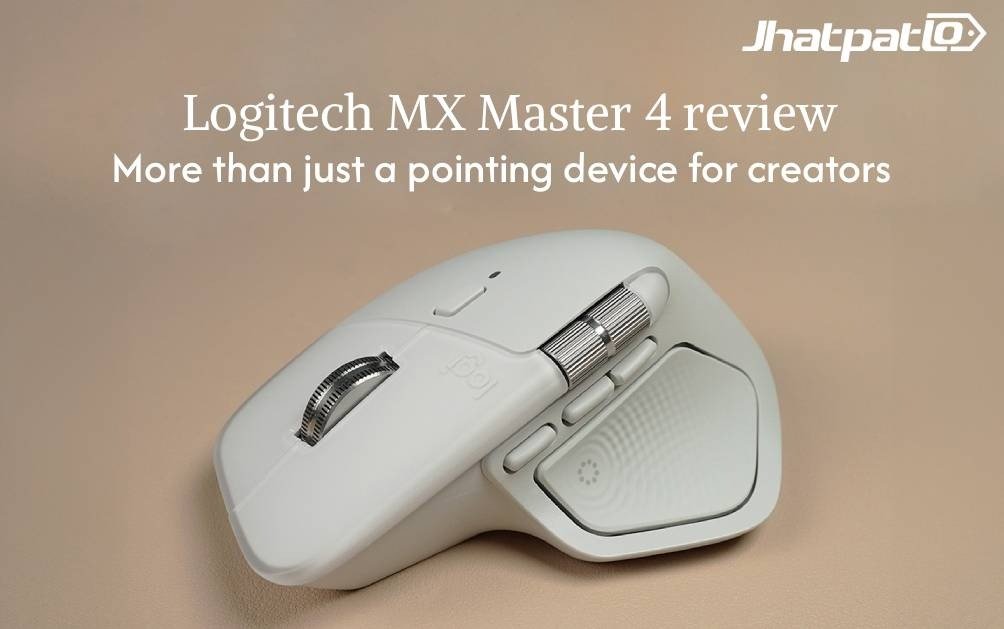
So you’ve built a workspace where speed and precision aren’t just nice to have—they’re essential. A premium mouse can be the quiet workhorse that keeps creative projects moving, or a distraction that slows you down. The Logitech MX Master 4 aims to be the former, building on a legendary line with features that actually matter in real workflows. It’s not just about moving a cursor; it’s about moving your edits, color tweaks, and timelines along faster and with less fatigue.
In this review, the MX Master 4 is put to the test for creators who juggle multiple apps, timelines, and color wheels. It’s priced at Rs 15,995 in India, which is a premium tag, but the claim is that you’re paying for real-world benefits that compound over a long day of work. Let’s see if those benefits hold up when the rubber meets the trackpad of a busy project.
What’s new
- The headline shift is haptics — subtle vibrations that give you tactile feedback during actions like scrolling and app switching. It isn’t flashy, but it feels surprisingly precise and reassuring once you get used to it.
- There’s a new Actions Ring that replaces the old thumb-rest gesture button. A press pops up a ring on screen offering quick access to media controls, emojis, screen locks, and even AI tools with a bit of customization through Logi Options+. The idea is delightful in theory and handy in practice, though the software experience can be a work in progress.
- A revamp in design and materials — the old rubberized surface makes way for a textured silicone finish that should stay grippier and cleaner over time. It feels more premium and, crucially, seems more resistant to everyday wear on busy desks.
- The MagSpeed scroll wheel returns with even more polish. You can toggle between a ratcheted mode for precise scrolling and a free-spin mode for swift navigation. The horizontal wheel is longer and easier to reach, which helps when you’re scrubbing timelines in video apps or fine-tuning exposure in photo editors.
- On the software side, the Logi Options+ ecosystem has grown, bringing deeper app profiles and Actions Ring customization. But there have been reports of stability quirks and the integration feeling a bit beta in practice.
These aren’t just cosmetic upgrades. They’re aimed at real-world tasks in apps like Photoshop, Premiere, and Lightroom, where a nudge on a dial or a quick gesture can save minutes across a long day.
Design, build and ergonomics
The MX Master 4 is instantly familiar if you’ve used the MX Master family before. The shell preserves the silhouette that many users love, with a few thoughtful refinements. The shell’s finish is now silicone-based rather than rubberized, which grips well and should be more forgiving on gloss/dust buildup. It’s not perfect new-car-smooth, but it feels cleaner and more resistant to wear than most rubber coatings.
There are 8 buttons in total, and the layout has shifted a little compared to earlier models. The gesture button has moved from the traditional thumb-rest zone to a position near the forward and back buttons. The change can free up the thumb area, but it also means re-training your finger routes if you’ve been on the 3 or 3S for a while. The MagSpeed wheel remains the star here, with lights and tactile feedback that make every increment feel deliberate. The horizontal wheel’s increased reach is a clear ergonomic win for long editing sessions.
The overall build feels sturdy, with a low-profile profile that still encourages a relaxed grip. It’s comfortable for long stretches, and the weight distribution is balanced in a way that supports both precise selection and broad sweeps across timelines and canvases.
Bottom line — if ergonomics are a priority, the MX Master 4 remains a top-tier option in this category. It’s designed to be a tool you forget about while you focus on the work, not a gadget you constantly fiddle with.
Performance and specifications
Under the hood, the MX Master 4 sticks to familiar territory with a high-end tracking setup. It uses the same Darkfield 8K DPI sensor that built the lineage’s reputation for smooth tracking on glass and glossy surfaces. In real-world terms, cursor movement is consistently smooth, with predictable response you can rely on for precise edits and timelines. It’s clearly designed for productivity rather than fast-paced gaming, where ultra-low latency and ultra-high polling could matter more.
In creative workflows, the combination of the haptic feedback and the refined wheel system helps when adjusting sliders in Photoshop or fine-tuning exposure in Lightroom. Those tiny tactile ticks as you move a slider make the process feel more deliberate, less guesswork. Even when working with color grading in Premiere, the wheel’s precision helps navigate frames, where a tiny nudge can be the difference between a good cut and a great one.
Battery life checks out in practice, with Logitech promising up to about 70 days per charge. The quick-charge feature is handy: a minute of charging can buy a few hours of use if needed. And for those who travel light, the USB-C receiver is tiny and surprisingly useful with modern laptops and tablets that still rely on wired USB-C connections.
One caveat for power users—this mouse is optimized for productivity. If gaming is a primary use case, you may want to consider other options that emphasize ultra-responsive latency and perhaps more aggressive button mappings for quick in-game actions.
Software and ecosystem
The MX Master 4 thrives when paired with Logi Options+ and the classic Flow feature. Across devices and platforms, Flow lets you move your cursor between a PC and a Mac and share a clipboard, which is a genuinely magical workflow enhancer for multi-device setups. The software also allows you to customize a broad range of actions and map them to buttons, including the new ring’s functions and the gesture controls.
Here’s the thing about software: it’s powerful, but the experience can feel a bit beta at times. The Actions Ring and some app integrations have had moments of freezing or slow responsiveness in testing. This doesn’t happen all the time, but it’s enough to remind that premium hardware still depends on equally dependable software to deliver the full story. If smooth software is essential, be prepared for occasional updates and a little patience as Logi Options+ matures.
For creators who live in apps like Photoshop, Premiere, and Lightroom, the combination of the hardware’s tactile feedback and the software’s deep customization can really pay off. The ability to create app-specific profiles means you can tailor button mappings and ring actions to your exact editing workflow, cutting down on menu hunting and tab-switching.
Reality check — the promise is excellent, and the hardware delivers. The software experience, however, still has some rough edges that prevent it from feeling completely polished day one.
Pricing, verdict and real-world usage
The MX Master 4 sits at Rs 15,995 in India. For many creators, that price is justified by the time saved on routine tasks, the fluidity of multi-device workflows, and the comfort factor during long editing sessions. The MagSpeed wheel, the extended horizontal wheel, and the refreshed silicone finish all contribute to a smoother, more confident editing experience. If those particular features align with your daily tasks, the investment starts to look more reasonable.
What makes the MX Master 4 compelling is not just the hardware polish but how it nudges your workflow forward in practical, repeatable ways. The wheel’s precision makes it easier to scrub timelines with confidence. The two-device, even multi-device, workflow is still a standout feature that keeps you from dragging files and windows manually across devices. The haptics add a tactile layer of feedback that enhances control without becoming distracting.
On the flip side, the software experience can feel a touch imperfect. If a perfectly seamless, always-on software suite is a must, there might be a gap until updates mature. For many users, this is still a small price to pay for a mouse that genuinely enhances creative productivity and long sessions of work.
| Aspect | MX Master 4 | MX Master 3S |
|---|---|---|
| Haptics | Yes — subtle vibrations for connection and alerts | No |
| Actions Ring | Yes — customizable ring for quick actions | Gesture button on thumb-rest |
| Finish | Textured silicone finish | Rubberized surface |
| Scroll wheel | MagSpeed with ratchet and free-spin; longer horizontal wheel | MagSpeed; shorter horizontal wheel |
| Software | Logi Options+ with broader integration; occasional quirks | Earlier, more stable software experience |
| Battery | Up to 70 days; quick-charge | Similar endurance in practice |
| Price (India) | Rs 15,995 | Earlier models |
So, who should consider the MX Master 4? If multi-device workflows, tactile feedback, and killer wheel control make a difference in daily editing and color work, this mouse is a strong contender. It’s not the cheapest option out there, but the combination of hardware refinements, ergonomic design, and deep software customization can translate into meaningful time savings over months of use.
Have you found haptics or the new Actions Ring transformative in your own setup? If you’re evaluating a new mouse for creative work, weigh how much you value long-term comfort, precise wheel control, and software polish. The MX Master 4 edges into a space where those benefits matter the most, and for many creators, that space is exactly where the work happens.
Would this be your default choice for creative workflows, or would you prefer a model with a bit more gaming-grade responsiveness? The question isn’t just about specs—it’s about how your daily routines line up with the mouse’s strengths. As always, the best tool is the one that disappears into your workflow and helps you stay in the zone.
Related Products




Motorola Edge 70 Pro+ India Launch Set for June 4 With Periscope Camera
Motorola Edge 70 Pro+ Launches in India on June 4 Motorola has confirmed the India launch date for the Edge 70 Pro+, with the phone set to arrive on June 4. The main update is a 50MP periscope camera with 3.5x optical zoom, a feature that was not present on the standard Edge 70 Pro. The launc...

Motorola Edge 70 Pro+ Geekbench Listing Reveals Dimensity 8400 Before India Launch
Motorola Edge 70 Pro+ Leak Puts Chipset Choice in Focus A Geekbench listing for the Motorola Edge 70 Pro+ has surfaced ahead of the June 4 India launch, showing the phone with a MediaTek Dimensity 8400 chipset, 12GB RAM and Android 16. The leak has drawn attention because the Pro+ appears to...

Motorola Edge 70 Pro+ Brings 6500mAh Battery Ahead of India Launch
Motorola Edge 70 Pro+ list appears with battery and camera focus Motorola’s upcoming Edge 70 Pro+ is set for an India launch on June 4, and the reported listing points to a 6,500mAh silicon-carbon battery, triple 50MP cameras, and a periscope zoom lens. The phone is also said to run Android 16 o...

Moto G37 Power Launches in India With 7000mAh Battery and Dimensity 6400
Moto G37 Power arrives with battery first focus Moto G37 Power Launch in India, putting a 7,000mAh battery at the center of its latest budget phone push. The device starts at Rs 14,999 and will go on sale from May 25 through Flipkart. The phone runs on the MediaTek Dimensity 6400 chipset and sh...

OPPO Find X9 Ultra Brings Native 10x Zoom to India at ₹1.69 Lakh
OPPO Is Turning the Find X9 Ultra Into a Camera First Flagship OPPO Find X9 Ultra launches in India at ₹1,69,999, putting native 10x optical zoom at the centre of the device’s pitch. The phone arrives as an ultra-premium Android flagship with a penta-camera system co-engineered with Hasselbla...

Asus ROG Flow Z13-KJP ProArt GoPro Edition and TUF Gaming A14 Launched in India
Asus ROG Flow Z13-KJP ProArt GoPro Edition and TUF Gaming A14 Launched in India Asus unveils three new laptops for the Indian market: the ROG Flow Z13-KJP, the ProArt GoPro Edition PX13, and the 2026 TUF Gaming A14. All three run Windows 11 Home and are built around AMD Ryzen AI Max+ processor...