


What Is a Vapor Chamber? Why It Matters for Gaming, Recording, and Phone Heat
Vapor Chamber Phone Cooling: What It Changes in Gaming, Camera Recording, and Throttling
A vapor chamber doesn’t make a phone faster on its own, but it can help a Snapdragon, Dimensity, or Exynos chip hold up under heat far better during gaming, 4K or 8K video recording, and 5G use.
If you’ve ever watched a phone start strong, then slowly get sluggish after a few minutes of gaming or recording, you’ve already met the problem this little part is trying to solve. It’s not flashy. It doesn’t get much attention. But it can change how a phone feels in real use, and that’s where it gets interesting.
Quick Highlights
- It helps phones stay steady under heat
- It’s about sustained performance, not peak speed
- Gaming and recording show the difference fastest
- Cooling depends on the whole design, not one part
Introduction
A vapor chamber phone cooling system spreads heat, reduces throttling, and helps a phone stay usable when demanding tasks keep pushing the processor.
The real question is not whether the phone can spike high for a minute, but whether it can keep performance steady once the temperature starts climbing. That’s the part most people feel in daily life. A phone that feels smooth at the start but stutters later can be way more frustrating than one that never tops the charts but stays consistent.
What a vapor chamber actually is, and why it behaves differently from a heat pipe
A vapor chamber is a flat, sealed metal chamber with a small amount of working fluid, usually water, plus a wick structure that keeps the cycle moving.
Heat turns the liquid into vapor near the SoC, the vapor spreads to cooler areas, then condenses and sends the heat back out across a wider surface than a traditional heat pipe.
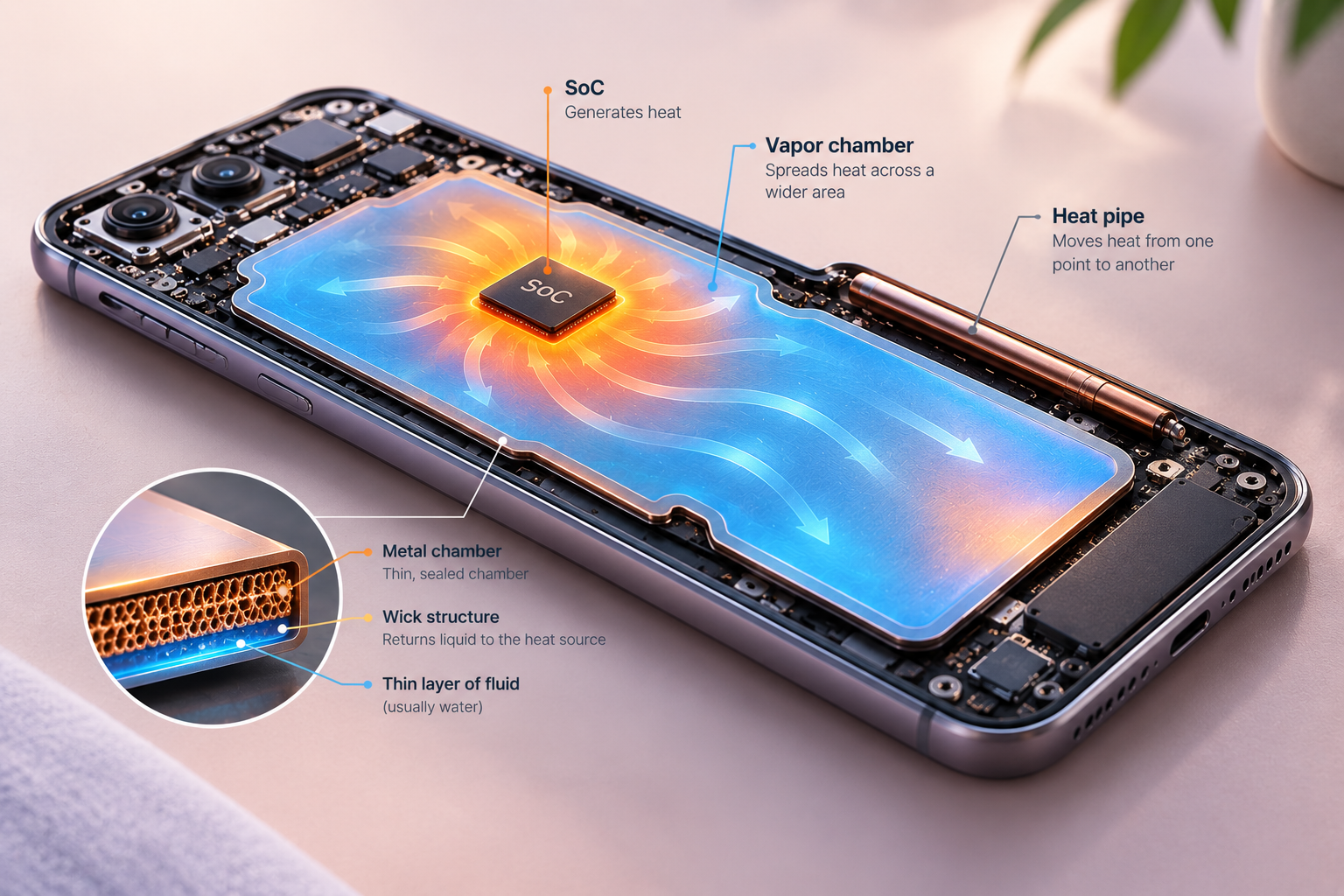
That wider, flatter spread is what makes it useful in smartphones, where internal space is tight and heat has to be managed without much room to work with. In plain English, it acts a bit like a tiny internal delivery system for heat, moving it away from the hottest spot instead of letting it pile up there.
How vapor chamber compares to other cooling types
The heat cycle inside the chamber
Heat is generated by the processor, the liquid absorbs it and becomes vapor, the vapor travels outward, and the wick brings the liquid back toward the hot spot.
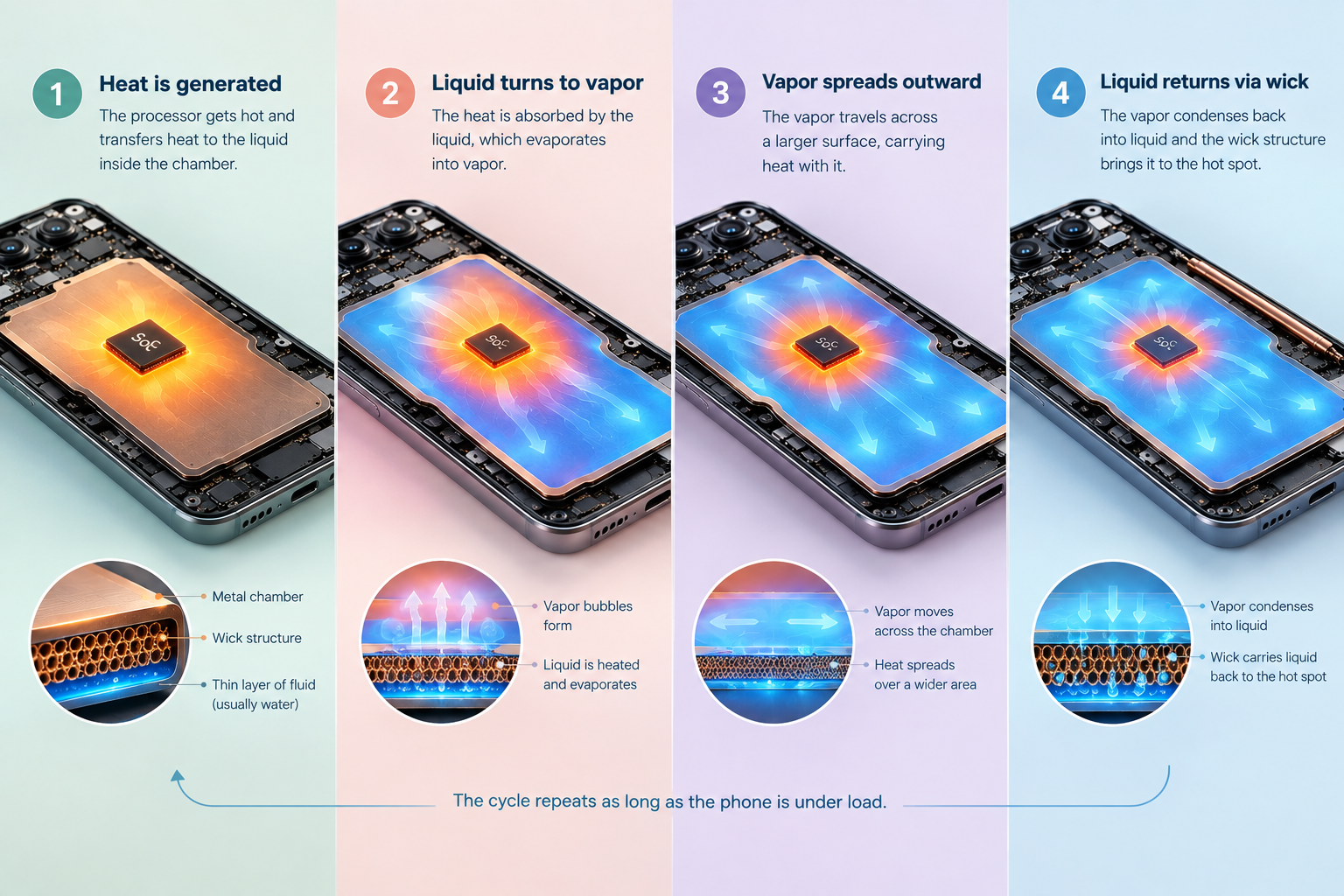
The process repeats continuously as long as the phone is under load, which is why the component matters most during long bursts rather than quick taps or short app opens. So if you just check a phone by opening a few apps, you may never notice it. But push it hard for a while, and the difference starts showing up.
Why modern phones need better heat dissipation
Today’s phones are doing more than calls and browsing: gaming, image processing, multitasking, AI processing, high-speed connectivity, and 4K or 8K recording all push a small body harder than it looks on paper.
When electrical power becomes heat and there is no active fan to help, the phone’s main defense is to slow the chip down — the thermal throttling most people notice only after performance starts sagging.
This is also where smartphone heat dissipation stops being abstract and starts affecting frame rates, charging behavior, and how warm the device feels in the hand. If you’ve ever had to stop a game because the phone got uncomfortably hot, that’s not just a comfort issue. It’s the cooling system telling you it’s running out of room to breathe.
Where the vapor chamber helps most: sustained performance, not peak speed
A vapor chamber does not increase the maximum processing power of a Snapdragon, Dimensity, Exynos, or any other chipset.
What it can do is help the phone sustain the performance it already has by spreading concentrated heat over a larger area and delaying thermal throttling.
That difference matters much more in long gaming sessions, long video recording, and other workloads that keep heat building minute after minute. In other words, it’s less about making your phone feel like a rocket and more about keeping it from stepping on the brakes too early.
What changes after 20–30 minutes of heavy use
A phone may look excellent in a short benchmark, then lower its clock speeds once the temperatures rise.
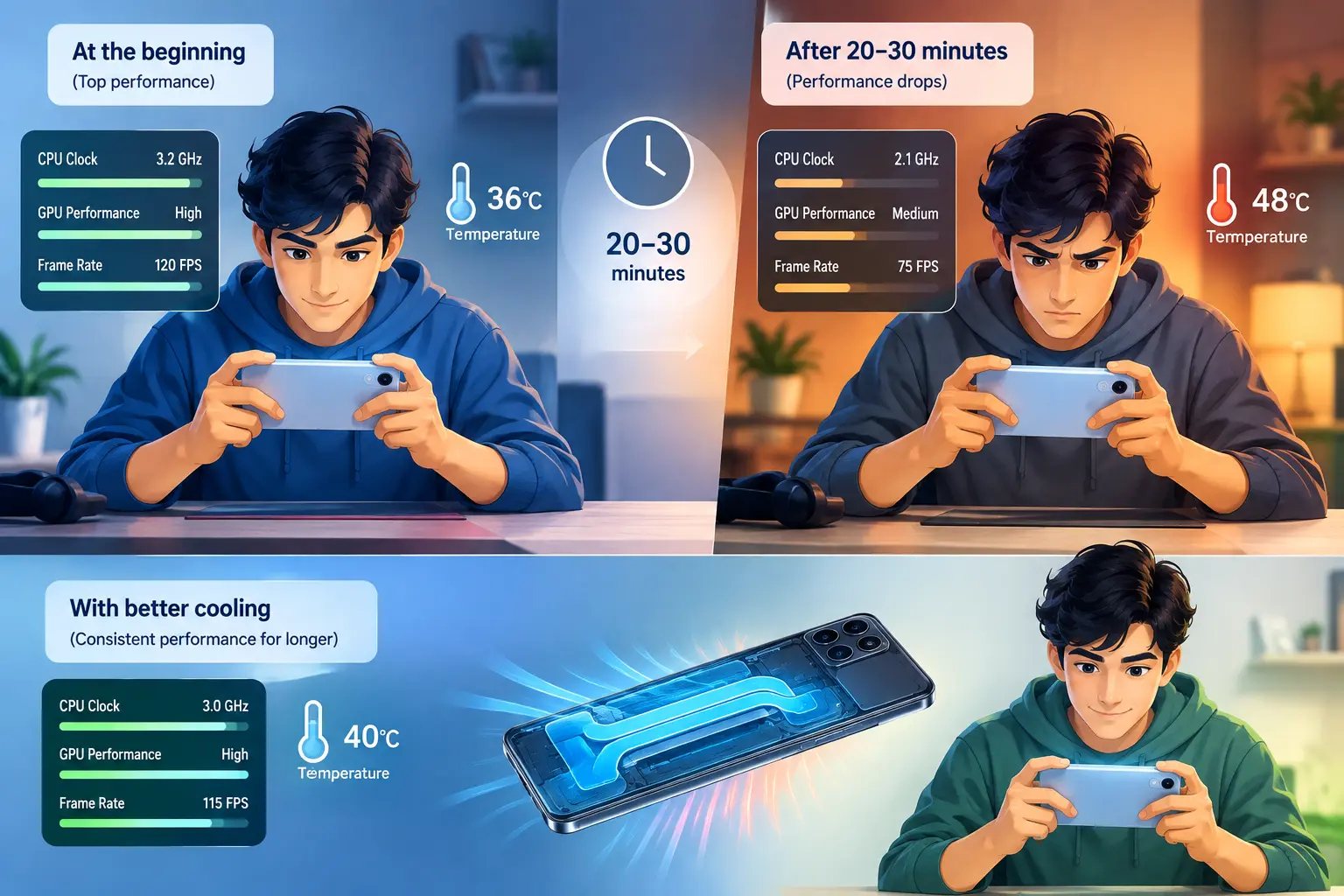
A stronger cooling design can keep long-duration CPU benchmarks, GPU stability tests, and gaming frame-rate consistency closer to the device’s top level for longer. That’s especially noticeable when the phone isn’t just warming up for a minute or two, but slowly building heat over an entire session.
What to compare instead of just reading the vapor chamber spec
Size alone is not the story, because the full thermal system decides whether a phone actually cools well.
That system includes the chamber thickness, internal wick structure, contact with the processor, thermal interface material, graphite and other heat-spreading layers, the phone frame, internal construction, software thermal management, processor efficiency, and ambient temperature.
Phone makers may advertise chamber dimensions, but a smaller chamber can still beat a larger one if the whole design is better thought through. That’s why the number on the spec sheet can be useful, but it’s never the whole answer.
| What to compare | Why it matters | What it tells you |
|---|---|---|
| Long-duration CPU benchmarks | Shows whether performance stays stable over time | Useful for spotting thermal throttling in smartphones |
| GPU stability tests | Reveals how gaming performance holds up | Helps identify phone overheating during gaming |
| Temperature after 20–30 minutes of heavy load | Shows whether heat spreads efficiently | Gives a clearer read on sustained performance benchmark behavior |
| Charging behavior at higher temperatures | Heat can change charging speed | Shows whether the phone protects itself under stress |
Why gaming and camera recording expose the difference so clearly
_webp.webp)
Gaming keeps the CPU and GPU under sustained load, which is exactly the kind of workload that exposes weak cooling.
A phone that scores high for a short burst but throttles hard after several minutes can feel very different from one that stays slightly slower but consistent.Camera recording heat management matters for the same reason: HDR, computational photography, AI features, stabilization
and high-resolution video all keep the chip working longer than most casual use. That’s why some phones feel fine taking a few photos, then get hot fast once you switch to a long recording session.
The parts of camera use that build heat fastest
- 4K or 8K video recording
- High frame-rate capture
- Stabilization and other processing overlays
- AI-based image processing and HDR
These are the moments when the phone has to do a lot more than simply save a picture. It’s processing, balancing, correcting, and storing in real time, and that adds up fast.
What heat does to the rest of the phone, not just the processor
When heat builds up, the processor slows down first, but the effects do not stop there.
Battery performance and charging behavior can change too, and the phone can become noticeably warm across the frame, rear panel, internal graphite layers, and other surfaces that help carry heat away.
The chamber does not erase heat; it just moves it out of the hot spot so the broader thermal structure has a better chance of dumping it into the surrounding air. That’s the key idea. It’s not magic. It’s managed spreading.
And this is why a hot phone can sometimes feel “fine” in the hand at first, then gradually become less responsive. The thermal system is working, but once enough heat is trapped inside, the device has to make trade-offs.
FAQ
These are the questions people usually ask after they understand the basics but still want to know what actually matters in a real phone.
Q: Does a vapor chamber improve battery life?
Not directly. Better cooling can help a phone avoid extreme temperatures, but battery life still depends on processor efficiency, display brightness and refresh rate, network connectivity, software optimization, background apps, gaming workload, and battery capacity.
Q: Can you feel the difference from a vapor chamber?
Sometimes. A phone may feel cooler in one area or warmer across a wider area, and that does not automatically mean the cooling system is worse — it may just be spreading heat more evenly.
Q: Are vapor chambers only found in expensive phones?
No. They were once tied mostly to flagship and gaming smartphones, but they now show up in more affordable performance-oriented devices too, with different chamber sizes and cooling configurations.
Q: What should you look at instead of just the chamber size?
Look for long-duration benchmarks, GPU stability, frame-rate consistency, temperatures during extended gaming, and reviews that show whether the phone keeps performance steady after 20–30 minutes of load.
Conclusion
The main value of vapor chamber phone cooling is not a dramatic speed boost; it is keeping performance steadier when the phone gets hot.
If you want the real answer on a device, ignore the big-number marketing and ask whether it can sustain performance when the workload lasts long enough to create heat. That’s the practical test, and honestly, it tells you a lot more than a shiny spec ever will.

Mahi Gupta
✉ mahigupta708076@gmail.comRelated Products









Motorola Edge 70 Max Launching on July 15 With Snapdragon 8 Gen 5
Motorola is getting ready to launch the Edge 70 Max in India on July 15, and the early details make it one of the more interesting premium Android phones to watch this month. The company has already confirmed a 7,000mAh battery, 90W charging, Snapdragon 8 Gen 5, magnetic wireless charging, and a Qua...

OnePlus N6x launched in India with 7000mAh battery and 15W charging
OnePlus N6x launched in India with a 7,000mAh battery and 15W charging, putting battery life ahead of fast top-ups. The phone also keeps the Dimensity 6360 Apex chipset, a 120Hz IPS LCD panel, and a value-focused price tag that starts at ₹18,999. OnePlus N6x keeps Dimensity 6360 Apex...

Pixel Call Recording Expands Across Europe Ahead of Global Rollout
Google is expanding Call Recording in the Pixel Phone app to more countries, extending beyond the United States. The feature, which first returned to select markets last year, is now appearing in additional regions in Europe. Recent reports indicate users in several European countries have the optio...

RedMagic 12 Pro+ design and colour options revealed ahead of launch
RedMagic 12 Pro+ design details are now public ahead of the phone’s October 15 debut in China. The new teaser shows a flat back, transparent colour options, 0.96mm bezels, and an under-display selfie camera, putting the hardware look front and center before launch. The RedMagic 12 Pro+ de...

Motorola Edge 70 Max Launch Brings Snapdragon 8 Gen 5 and 7100mAh Battery
Motorola’s Edge 70 Max is shaping up as a launch focused on two things buyers tend to notice first: battery life and speed. Ahead of its July 15 debut in India, the device is being positioned as a flagship with a large battery, a new Snapdragon chip, and a few features that are still uncom...