


5 Best AI Smartphones Under Rs 30,000 With Real Features You’ll Actually Use

Introduction
If you’re comparing the best AI smartphones under 30000, the real question isn’t whether a phone has AI anymore. It’s whether those tools actually make daily life easier. And honestly, that’s where the whole conversation gets more interesting. A lot of phones can toss around fancy terms, but only a few give you things you’ll touch again and again, like quicker photo fixes, smarter search, better battery behavior, and cleaner ways to handle notifications.
That changes how you shop. A good mid-range phone is no longer just about processor speed or camera specs; it’s about which AI tools fit the way you live. Maybe you want help with messaging. Maybe you want better photos without opening a dozen editing apps. Or maybe you just want a phone that quietly gets out of your way. Either way, the useful stuff is much more specific than most buyers expect.
- Look for AI you’ll use daily, not just demo features.
- Motorola leans into productivity and organization.
- Samsung feels safest for software support and convenience.
- Realme brings a strong mix of gaming and photo tools.
- OnePlus and Vivo keep things simple for editing and camera quality.
Motorola Edge 70 feels built for people who want AI to reduce friction
Motorola’s angle is pretty clear: productivity first, flashy demos second. The whole point of Moto AI 2.0 is to make the phone feel less demanding. So instead of making you dig through menus or manage everything manually, it gives you tools that fit into normal routines. Catch Me Up helps you catch up on notifications. Pay Attention is aimed at helping you stay focused. Remember This is there when your brain is full and you just need the phone to hold onto something for later. Then you’ve got Next Move, AI Image Studio, and Text to Sticker, which make the phone feel like it’s actually trying to help, not just impress.
That’s why the Motorola Edge 70 stands out for people who want a practical all-rounder. It pairs those features with a smooth AMOLED display and versatile cameras, so you don’t feel like you’re buying a one-trick phone. It’s the kind of device that quietly covers a lot of ground. And if you’ve ever used a phone that looked exciting on paper but felt awkward in daily use, you’ll probably appreciate that approach.
The Moto AI 2.0 tools are the real reason to look at it
What makes Moto AI 2.0 interesting is that it doesn’t lock itself into one narrow job. It covers notifications, organization, and content creation in one place, which is a lot more useful than a random AI filter you try twice and forget about. Catch Me Up is helpful when you’ve been busy and don’t want to scroll through everything. Pay Attention leans toward focus. Remember This works like a light memory aid. Next Move is about helping you act faster. And then AI Image Studio plus Text to Sticker give it a creative side without making it feel gimmicky.
That balance matters. A lot of AI features sound nice in a launch video but end up being novelty tools. Here, the idea is more practical. If your day is messy, a phone that helps organize the chaos is suddenly a very real advantage.
Samsung Galaxy M47 is the safest pick if you want AI plus long-term software support
Samsung is taking a broader, system-style approach here, and that will probably appeal to a lot of buyers. The Galaxy M47 brings Circle to Search, Google Gemini integration, voice transcription, AI-powered photo editing, and intelligent battery optimization. That’s a pretty strong mix if you want features that feel built into the phone rather than bolted on. Some phones give you one flashy AI trick. Samsung gives you a more rounded experience.
This is also where the Circle to Search phone use case becomes very obvious. You see something on-screen, circle it, and get to the answer faster. No switching apps, no copying and pasting awkwardly, no extra steps. Add Gemini integration, and the phone starts feeling smarter in small but meaningful ways. If you care about software support too, that’s another point in Samsung’s favor. The whole package feels stable, which matters more than people admit when they’re spending this much money.
The AI features lean more toward convenience than creativity
On the Galaxy M47, the value isn’t in one dramatic feature. It’s in how many tiny tasks it compresses. Search becomes faster. Transcription becomes easier. Photo cleanup is less annoying. Battery management gets more intelligent. That means the phone starts feeling aware of what you’re trying to do, even if it never shouts about it.
That kind of convenience is easy to underestimate. But in daily use, convenience is usually what sticks. It’s the difference between “nice, that’s cool” and “oh, I use this all the time.”
Realme P4 Power is the one that splits its attention between photos and gaming
Realme takes a more focused route with the P4 Power. Instead of trying to be everything to everyone, it leans into two big areas: image editing and gaming. AI Edit Genie and AI Travel Snap help with photos, while Hyper Clarity and Hyper Motion are there to improve gaming visuals. So if you’re the type who spends half the day taking pictures and the other half playing games, this phone makes a pretty good argument.
The large battery matters here too. That’s not just a side note. AI-powered features only feel useful when the phone can keep up with them all day. If a device gets drained too quickly, those clever tools become a bit of a burden. Realme seems to understand that endurance and smart features need to work together.
Here the comparison is really between editing speed and gaming smoothness
| Feature area | Realme P4 Power tools | What they do |
|---|---|---|
| Photo editing | AI Edit Genie, AI Travel Snap | Simplify image editing |
| Gaming | Hyper Clarity, Hyper Motion | Improve gaming visuals |
| Endurance | Large battery | Keeps AI features usable all day |
If you like phones with a clear personality, this one has it. It doesn’t pretend that everyone needs the same thing. It says, in effect, “Do you care more about getting better photos quickly, or smoother gameplay?” That makes the choice simpler, which is not a bad thing at all.
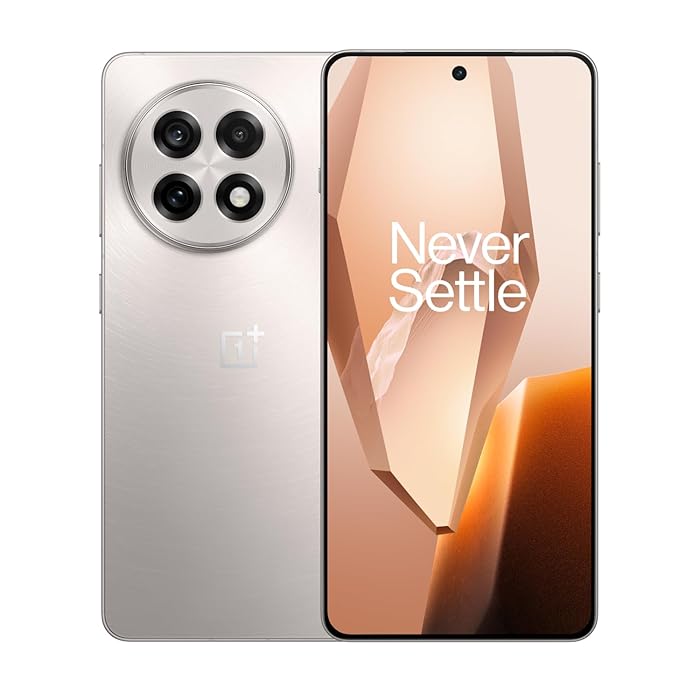
OnePlus N6 is the easiest option for quick photo fixes without extra apps
OnePlus keeps this one narrow, and that’s exactly why it works. The OnePlus N6 is built for people who want fast AI photo help without a learning curve. AI Eraser removes unwanted objects. AI Perfect Shot improves portraits. AI Portrait Glow helps with lighting. And AI Unblur sharpens soft images. That’s a pretty straightforward toolkit, and sometimes straightforward is the best kind of smart.
This is also the clearest example of AI Eraser for photos doing one job well. If you’ve ever taken a nice picture only to notice a trash can, stranger, or random distraction in the background, you already understand the appeal. You don’t need a complex editing app for that. You just want the problem gone. OnePlus gets that.
The editing tools cover the most common problems people actually have
What’s nice here is how practical the feature set is. Unwanted background clutter, dull portraits, weak lighting, and soft focus are the exact issues these tools target. There’s no awkward detour into fancy creative tools you may never use. The phone is basically saying: here are the things that make everyday photos annoying, and here’s a quicker way to fix them.
That’s why it feels useful rather than padded. A lot of AI features sound impressive until you realize they solve a problem you don’t really have. This is the opposite. Most people have at least one photo problem every week, probably more.
Vivo T5x is the balanced choice if you care more about camera quality than a long feature list
Vivo takes a quieter route with the T5x. Instead of loading the phone with a long list of AI tricks, it keeps the attention on AI-powered photography and steady hardware behavior. AI Erase removes distractions, while intelligent image enhancement automatically improves color, sharpness, and overall image quality. That makes the phone feel calm and dependable, which is not flashy, but it’s useful in real life.
This is the option for users who want the phone to do its work in the background instead of constantly asking them to tweak settings. If you like your technology to feel invisible in the best way, Vivo has a real case here. It’s less about showing off and more about making photos look better with minimal fuss.
And that can be a very good fit if camera quality is more important to you than collecting the largest possible feature list. Not every buyer wants a long menu of tools. Some people just want the shot to come out well. Simple as that.
FAQ
These questions come up a lot once people start comparing AI phones under Rs 30,000. What matters most? What is actually useful? And is the AI worth choosing over raw specs? The short answer is yes, but only if the features match the way you use your phone.
Q: Which AI phone is best for productivity?
Motorola stands out because Moto AI 2.0 is built around notifications, reminders, and organizing information rather than just editing photos. If your day feels busy and messy, that kind of support can be surprisingly helpful.
Q: Which phone is better for gaming and AI together?
Realme P4 Power makes the strongest case here because it combines Hyper Clarity and Hyper Motion with a large battery. That mix makes the phone feel more prepared for long gaming sessions without cutting off the AI side.
Q: Which phone has the best photo editing tools?
OnePlus N6 is the clearest pick if your main need is fast AI photo editing, especially with AI Eraser, AI Perfect Shot, AI Portrait Glow, and AI Unblur. It’s built to make quick fixes easy.
Q: Is Gemini integration useful on a mid-range phone?
Yes, especially on the Samsung Galaxy M47, where Google Gemini integration sits alongside Circle to Search, transcription, and battery optimization. It gives the phone a smarter, more connected feel without making the experience complicated.
Conclusion
The smartest move with AI smartphones under Rs 30,000 is to choose the one whose AI matches how you actually use your phone, not the one with the longest spec sheet. That sounds obvious, but it’s easy to forget when every brand is trying to sound futuristic. The real value comes from the stuff you’ll notice every day, not the feature you show your friends once and never open again.
If you want productivity, pick Motorola. If you want software confidence, Samsung makes sense. If you want gaming, Realme is the better fit. For editing photos fast, OnePlus is hard to ignore, and Vivo stays appealing if you want a balanced camera-first phone. In the end, the best AI smartphone isn’t the one with the most AI. It’s the one that actually makes your day feel a little easier.

Mahi Gupta
✉ mahigupta708076@gmail.comRelated Products




Samsung Galaxy A57 5G and A37 5G reveal AI upgrades that change mid-range phones
Samsung expands Galaxy A lineup Samsung Launches Galaxy A57 5G and A37 5G, adding two new Galaxy A series devices with enriched Awesome Intelligence, upgraded camera hardware, stronger performance and long-term software support. The phones are set to go on sale from 25 March, with the Gal...
 Launches in India.webp)
Nothing Phone (4a) Launches in India Next Week With Periscope Camera
Upcoming smartphone launches in India March opens with a lineup of smartphones poised to reach Indian buyers. Nothing will unveil the Phone (4a) globally and in India on March 5, followed by Motorola’s Edge 70 Fusion on March 6. Realme is also staging multiple launches in the period, incl...
Ai+ Pulse 2 Launches in India With 6000mAh Battery and 50MP Camera
Ai+ Pulse 2 Launches in India and Availability Ai+ Pulse 2 was launched in India on Monday by the smartphone maker as the latest addition to its lineup. The handset is set to go on sale in the country later this month via an e commerce platform. It will be offered in five colourways and t...

Realme 16T Price Leak Points to Rs 29,999 Battery Focus
Realme 16T Leak Signals a Battery First Mid Range Strategy Realme 16T Price Leak of Rs 29,999 for the 6GB plus 128GB variant ahead of its May 22 launch. The leak points to an 8,000mAh battery, AI camera features and a position below the standard Realme 16 lineup. The details suggest Realme is l...

Smartphone Price Hike Roundup Lists Revised Prices Across Samsung OPPO Vivo and More
Smartphone Price Hike across brands Smartphone prices are climbing across the board, with revised tags now appearing on devices from Samsung, OPPO, OnePlus, Realme, Vivo, iQOO, Motorola and Nothing. The increases are being linked to a strained supply of memory components, and the changes are...

AI+ Launches NovaPods Go Pro Clips and NovaWatch Range in India Ahead of Flipkart Sale
AI+ on Tuesday announced the rollout of the NovaPods Go, NovaPods Pro, and NovaPods Clips alongside the NovaWatch Active, NovaWatch Kids 4G, and Ai+ Wearbuds in India. The new AIoT lineup covers wireless earbuds and smartwatches aimed at the affordable to midrange market. All NovaPods mode...