


HP EliteBook X G2i Review: A Business Laptop That Knows Its Job
Introduction
The HP EliteBook X G2i review starts with the part that makes people click: under-1kg design and nearly 14-hour battery life in the same machine. That combo is rare enough to matter, especially when you’re looking at a work laptop that’s supposed to travel well, stay secure, and not feel like a compromise every time you open it. The real question is whether HP spent the money where a business buyer actually feels it — security, portability, and everyday reliability — instead of chasing the better screen rivals are offering.
Quick Highlights
- Under 1 kg, but still feels built for work
- Strong battery life for a small business machine
- Sure View is useful if you work in public
- Plenty of ports, which is refreshingly practical
- Performance is fast enough for heavy multitasking
Why the EliteBook X G2i feels like a business laptop the moment you pick it up
It looks plain on purpose, and that restraint makes sense for the audience HP is aiming at. The HP EliteBook X G2i isn’t trying to win the room with flash. It’s trying to be the laptop you trust when your day is full of meetings, spreadsheets, travel, and the usual little annoyances that happen when you’re working on the move.
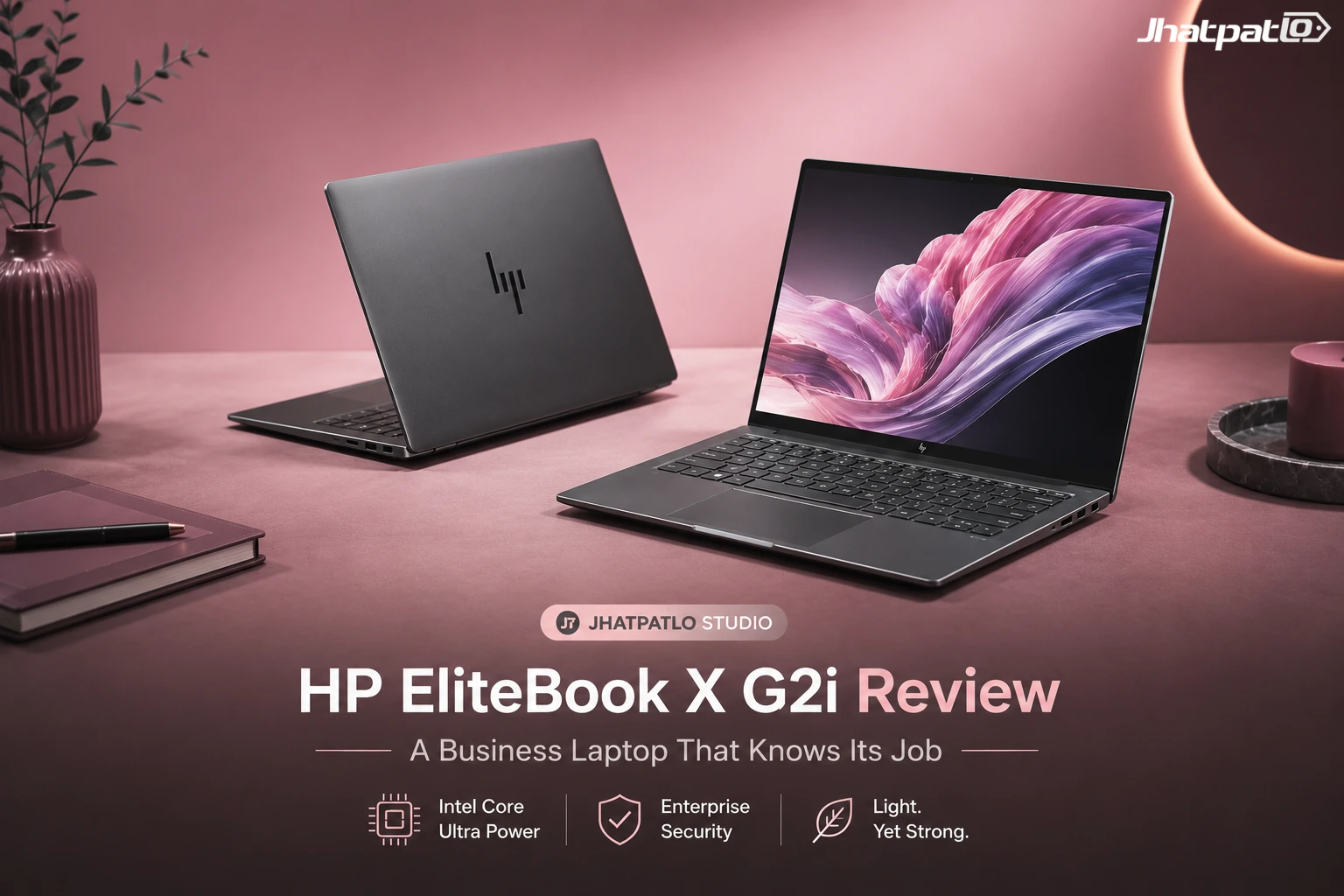
The magnesium chassis comes in Eclipse Gray, Atmospheric Blue, or Glacier Silver, and the whole machine stays under a kilo while the keyboard deck feels firmer than the lid. That split matters more than it sounds. The laptop disappears in a bag, but the lid flex is the first reminder that not every part feels equally premium. Still, the overall feel is very much “serious business tool” rather than “thin laptop pretending to be one.”
The weight is the point; the lid flex is the trade-off
Under-1kg portability is the feature that changes how you use it day to day, especially on a work laptop you carry between meetings and commutes. You notice it most when you’re lifting it with one hand or tossing it into a backpack alongside chargers, notebooks, and the rest of the office-in-a-bag routine. That’s where the EliteBook X G2i really earns its place.
The review notes that generous rubber padding keeps it planted on a desk and that one-handed opening works well, but the lid still gives more than the rest of the chassis when pressed. So yes, there’s a trade-off here. It’s not fragile in a scary way, but you can tell HP was saving weight wherever it could. For many buyers, that’s a reasonable exchange. For others, it’ll be the one thing they keep noticing.
What you get for the money: ports, wireless, security, and the specs inside
This is the section where HP stops behaving like a thin consumer laptop maker and starts acting like an IT-friendly business brand. And honestly, that’s a good thing. The configuration tested has the Intel Core Ultra X7 358H, 32GB LPDDR5X RAM, and a 1TB PCIe Gen5 SSD, with pricing starting at ₹2.5 lakh. That’s not casual money, so the machine needs to justify itself with more than a slim silhouette.
On top of that, there are two Thunderbolt 4 Type-C ports, one additional 10Gbps Type-C, a powered USB-A port, full-size HDMI 2.1, a combo audio jack, a nano lock slot, Wi‑Fi 7, Bluetooth 6, and HP Wolf Security running from the BIOS upward. That last part matters. Security features on business laptops can sound abstract until you’re in a shared office, airport lounge, or client site, and then they suddenly feel like the whole point.
The port selection is unusually complete for a thin laptop
| Port / Feature | What it gives you | Why it matters |
|---|---|---|
| 2 Thunderbolt 4 Type-C ports | Fast data, charging, display output | A flexible base for docks and monitors |
| 1 additional Type-C port at 10Gbps | Extra wired connectivity | Reduces dependence on adapters |
| 1 powered USB-A port | Legacy device support | Good for dongles, drives, and older accessories |
| 1 full-size HDMI 2.1 port | Direct display connection | Easy meeting-room and external monitor use |
| 1 combo audio jack | Headphone and mic support | Still useful for calls and travel |
| 1 nano lock slot | Physical security | Important in offices and shared spaces |
All three Type-C ports support power delivery and display output, so charging and external displays are not fighting for the same socket. That matters more than it sounds on a laptop this thin, because it avoids the usual hub dependency. You can show up at a desk, plug in one cable, and get on with your day. That’s boring in the best way.
Why the display is the weakest part, even though Sure View is genuinely useful
The 14-inch 1920x1200 IPS LCD is perfectly usable for documents, spreadsheets, and video calls, but it is also the part of the machine that feels hardest to defend at this price. HP does offer a 3K OLED on this same machine, yet this configuration gets the IPS panel instead, and the viewing angles fall off sooner than they should. If you spend a lot of time staring at a screen, that choice will probably stick in your head.
Now, the interesting wrinkle is Sure View. The Sure View privacy display is the real standout: it blocks shoulder surfing well, including in flights, cabs, and coffee shops, but it also dims the screen heavily and locks you out of brightness control while it is active. So it’s one of those features that feels brilliant in the right context and a little annoying in the wrong one. If your job involves sensitive information in public spaces, it’s genuinely valuable. If not, it may feel like a niche benefit with a visible cost.
Sure View is the feature you remember, but it changes the way the panel behaves
It is excellent for anyone handling sensitive work in public, and the Galaxy S26 Ultra comparison makes the effect easy to understand: people beside you see almost nothing usable. That’s the whole point. You don’t have to be a privacy obsessive to appreciate that kind of protection when you’re checking finance data, client files, or anything else you’d rather not broadcast to the seat beside you.
That benefit comes with a cost, though, because the screen gets much darker when Sure View is on, and the brightness setting cannot be adjusted until it is turned off. That’s the kind of thing you really only tolerate if the privacy benefit matters more than convenience. For the right buyer, it absolutely can.
How fast the Core Ultra X7 358H actually is in real use
The Core Ultra X7 358H is the part that proves HP did not underbuild this machine. It is a 16-core Panther Lake chip clocked at 3.69GHz, and in testing it hit 2052 single-core and 15495 multi-core in Cinebench R23, with an MP ratio of 7.55x. Geekbench 6 showed 2861 single-core and 16309 multi-core, ahead of the Dell XPS 14 at 2762 / 14789 and the Galaxy Book6 Pro at 2762 / 16177. Those are solid numbers for a slim machine that’s clearly trying to keep up with heavier competition.
The point isn’t just benchmark bragging rights. In practice, performance needs to feel smooth in the stuff people actually do all day: browser tabs, messaging apps, presentations, meetings, documents, and random background tasks that never seem to end. That’s where the EliteBook X G2i comes across as more capable than its size suggests.
The benchmark numbers line up with the kind of multitasking this laptop is built for
| Test | HP EliteBook X G2i | Closest rivals mentioned |
|---|---|---|
| Cinebench R23 | 2052 single-core, 15495 multi-core, 7.55x MP ratio | HP OmniBook 5: 8006 multi-core on Intel Core Ultra 7 355 |
| Geekbench 6 | 2861 single-core, 16309 multi-core | Dell XPS 14: 2762 / 14789; Galaxy Book6 Pro: 2762 / 16177 |
| Cinebench 2024 | 107 single-core, 651 multi-core | Dell XPS 14: 124 / 681; Galaxy Book6 Pro: 113 / 623 |
| PCMark 10 | 5682 overall, 10320 Essentials, 7004 Productivity, 6888 Digital Content Creation | Real-world browsing, video calls, spreadsheets, and photo editing |
In practice, it kept up with more than 20 Chrome tabs plus folders and apps running in the background without stuttering, helped by the 32GB RAM and 1TB SSD. That’s exactly the kind of everyday performance that matters in a business laptop. Nobody really cares if a machine can win a chart by a tiny margin if it chokes when you’re simply trying to get through a workday. This one doesn’t.
Battery life and speakers are stronger than they have any right to be
The battery story is better than the size suggests, even with the smaller 56Wh cell. PCMark 10 battery testing at 50 percent brightness returned 13 hours and 18 minutes, which sits close enough to the “nearly 14-hour battery life” claim to make sense in real use, and the larger 68Wh version should go further still. That’s the sort of result that makes a slim laptop much easier to trust on travel days.
The audio is the surprise: four Poly-tuned speakers fire upward from either side of the keyboard, get properly loud, and even carry enough bass to beat the Galaxy Book6 Pro comfortably. Business laptops often treat speakers like a checkbox. This one doesn’t feel that way. It’s a small thing, but it makes calls, video, and even casual music less punishing than you’d expect from a thin work machine.
The smaller battery still delivers all-day use
- Battery size tested: 56Wh
- Battery life result: 13 hours and 18 minutes
- Brightness used: 50 percent
- Expected larger battery option: 68Wh
That is enough to leave the charger behind for a full workday, which is really the only battery metric this class cares about. If you’re moving between desks, meeting rooms, trains, and coffee shops, that kind of consistency is worth more than a flashy peak number.
Should you buy the EliteBook X G2i instead of the XPS 14 or Galaxy Book6 Pro?
If you want the best screen for the money, the Dell XPS 14 and Galaxy Book6 Pro make a stronger case because both give you OLED where HP gives you IPS here. That’s not a minor difference, either. OLED usually brings better contrast, deeper blacks, and a more premium feel the second the display lights up.
If you care more about the business-laptop stuff — sub-1kg weight, Wolf Security, Sure View, serviceability, port flexibility, and support for sensitive work in public — the EliteBook X G2i is easier to justify. It’s the more practical machine, even if it isn’t the prettiest screen in the category. That’s the trade. And for the right buyer, it’s a smart one.
This is not the machine for someone chasing personality or the best display in the room; it is for someone who wants a work laptop that stays out of the way and does the security-heavy, travel-heavy parts properly. In other words, it knows its job and doesn’t waste time pretending to be something else.
FAQ
These are the doubts that tend to show up after the specs look good but the compromises start to matter.
Q: Is the HP EliteBook X G2i good for battery life?
Yes. The tested unit lasted 13 hours and 18 minutes in PCMark 10 at 50 percent brightness, and HP’s larger 68Wh battery should stretch it further.
Q: Is Sure View worth it on the EliteBook X G2i?
If you work in public a lot, yes. It kills shoulder surfing extremely well, but it also dims the screen and disables brightness adjustment while active.
Q: Does the EliteBook X G2i have enough ports?
Definitely. Between 2 Thunderbolt 4 ports, a 10Gbps Type-C, USB-A, HDMI 2.1, audio, and a nano lock slot, it avoids the usual dongle problem.
Q: Is the display a deal-breaker?
For some buyers, yes. The IPS LCD is fine for work, but the viewing angles are weaker than they should be and OLED rivals look better for similar money.
Conclusion
The HP EliteBook X G2i makes sense if your idea of a good laptop is one that stays light, stays secure, and keeps working without drawing attention to itself. It’s not trying to be the most exciting laptop in the room. It’s trying to be the one that quietly handles the important stuff, and it mostly succeeds.
If you want the best screen for the money, look elsewhere; if you want a business laptop that earns its keep through portability, battery life, performance, and public-facing privacy, this one lands exactly where it should. That’s the real story here.

Related Products



ThinkBook 14 2-in-1 G6 IPL Global Launch With Panther Lake Chips
Lenovo has started a global release of the ThinkBook 14 2-in-1 G6 IPL, bringing the 14-inch convertible to the US and Canada after its MWC debut. The lineup begins with a Core Ultra 5 325 and goes up to a Core Ultra 7 355 with 32 GB RAM, placing it in the premium business-laptop segment....

Samsung Galaxy Book 6 Ultra Goes On UK Sale With 16 inch AMOLED Display and Nvidia GeForce 5070
Samsung has introduced the Galaxy Book 6 Ultra, Galaxy Book 6 Pro, and Galaxy Book 6 in the United Kingdom, following their showcase at CES 2026 in January. Prices start at £2,999 for the Ultra, with pre-orders opening February 25 and official sales beginning March 11. The company also plans a...

HP OmniBook AI PCs Launch in India With Intel and Snapdragon Options
HP launches OmniBook lineup in India HP has launched the OmniBook Ultra 14, OmniBook X and OmniBook 5 in India, putting AI performance at the center of its new premium laptop push. The lineup includes both Intel Core Ultra and Qualcomm Snapdragon X options on the OmniBook Ultra 14, while the...

ASUS Launches ExpertBook Ultra P3 and P5 in India with Intel Core Ultra Chips
ASUS expands ExpertBook business laptop lineup in India ASUS ExpertBook Ultra Launches in India along with the ExpertBook P3 and ExpertBook P5, widening its business laptop range with new Intel Core Ultra processors and updated displays. The lineup includes the ultra-light ExpertBook Ul...
HP launches HyperX OMEN 15 with RTX 5060 in India
For JhatpatLo, HP has launched the HyperX OMEN 15 gaming laptop in India, the first device to debut under its new HyperX gaming brand unveiled at CES 2026. HP says the laptop is designed to handle modern AAA games, esports titles, and content creation workloads with sustained performance. HyperX...
Dell Brings Back XPS 14 and XPS 16 in India Starting at Rs 2,05,990
Dell restores XPS lineup in India Dell XPS 14 and XPS 16 launch in India, bringing back the XPS name in its premium laptop range. The two models start at Rs 2,05,990 and Rs 2,78,550, and both are built around Intel Core Ultra Series 3 processors. Dell says the laptops are rebuilt from scratch...