


Acer Aspire Go 14 U5-125H 16/512GB 14" Laptop AG14-71M supports student coding, with specs and analysis
72/100
-
 Intel Core Ultra 5 125H
-
 16
GB
-
 512
GB
-
 14
inch
-
 1920 x 1200
-
 Intel Arc

Acer Aspire Go 14 U5-125H 16/512GB 14" Laptop Price Comparison & History in India

Wait: This Acer Laptop Is Far Too Expensive
At ₹78,990 on Amazon, this laptop is currently a poor buy. That’s 34% above its average of ₹59,016 across 393 tracked days. Prices have climbed sharply from the ₹49,990 all-time low on Amazon. The Acer Aspire Go 14 spent much of its earlier history at more reasonable levels. Recent movement is upward, reaching the highest recorded level this year. It has also risen after previous drops, so today’s spike doesn’t look stable.
Amazon was cheapest in the latest listing, but that doesn’t make today’s offer attractive. Flipkart appeared cheaper on several earlier dates, while recent tracking has mostly covered Amazon. That platform difference matters because shoppers may mistake one listing for the market rate. The Acer Aspire Go 14 still offers 16GB RAM and 512GB storage for everyday work. It suits office work, study, browsing, and light multitasking without needing upgrades soon. Gaming and demanding creative work need stronger hardware. If you need a compact work laptop today, you can still use it comfortably. Otherwise, wait for a meaningful drop before buying this model.
 Processor
75
 Display
67
 Battery & Charging
74
 Design & Build
73
 Keyboard, Camera & Audio
51
- Wi-Fi signal reaches two rooms easily
- NPU handles basic AI tasks
- Automatic backups protect work documents
- Palm rest discolours with regular use
- Power button feels dated to use
- Keyboard backlight shuts off after 30 seconds
- Fingerprint reader is missing
- No utility app for driver updates
Acer Aspire Go 14 U5-125H 16/512GB 14" Laptop Features & Overview
Usage
The Acer Aspire Go 14 is built as a truly portable work buddy. Acer Aspire Go 14 U5-125H 16/512GB 14" Laptop AG14-71M supports student coding, with specs and analysis. In usage, you open the lid and the 14 inch LCD greets you with crisp text at 1920x1200. With Windows 11 Home preinstalled, launching essential apps feels snappy, especially with 16 GB DDR5 RAM under the hood.
Capacity
The machine ships with 16 GB RAM (upgradable to 32 GB) and 512 GB NVMe SSD, so you have room for files and apps. The 55 Watt Hour battery sustains mixed use, and the light 1.5 kg profile makes commuting easier. Acer Aspire Go 14 U5-125H 16/512GB 14" Laptop for coding.
Controls
The compact keyboard offers a solid feel with a satisfying key travel; the lid opens easily and the display responds to touch across a wide viewing angle. The device includes USB-C and USB-A connections for accessories and easy dongle use.
Durability
Despite its ultra portable form factor, the chassis stays flat and sturdy. The gray finish hides fingerprints and the display remains legible in various lighting conditions. The hinge produces a quiet, reassuring click as you open it.
Safety
Safety is basic but solid here with a limited one year manufacturer warranty; the system ships with automatic backup software for peace of mind.
Installation / Warranty
Box contents include the laptop, power cord, adapter, and user manual. The device comes with Windows 11 Home preinstalled and a straightforward setup routine.
Acer Aspire Go 14 U5-125H 16/512GB 14" Laptop Technical Specifications
Acer Aspire Go 14 U5-125H 16/512GB 14" Laptop FAQs
Aspire Go 14's built-in speakers are the weak spot here. They sound thin and quite low for movies, even though they work for alerts and basic calls. Plugging in headphones through the 3.5mm jack gives you much better audio.
Battery life lands around five to six hours for regular work. The 55 Wh battery handles browsing, documents, and coding sessions without needing the charger immediately. Charging takes roughly two to three hours, with the final stretch after 70% taking longer.
At 1.5 kg, Aspire Go 14 is easy to carry in a backpack. The 14-inch body fits well on travel tables and stays comfortable on a lap. It gives you useful screen space without feeling like a heavy work laptop.
The chassis feels solid, with a mix of metal and plastic around the body. The grey finish looks clean and doesn't attract fingerprints quickly. The plastics around the webcam and palm rest feel cheaper than the rest.
Against the Lenovo IdeaPad Slim 5, Aspire Go 14 gives you 16GB DDR5 RAM, a 512GB NVMe SSD, and a 16:10 display. Its HDMI, Ethernet, and SD card ports are useful when a desk setup includes older monitors or wired networks. For documents, browser tabs, and calls, the Acer setup is already more than enough.
Aspire Go 14 is well suited to coding because the Core Ultra 5 125H works with 16GB DDR5 memory. The 16:10 screen gives more vertical room for code and browser panels, while the 1.5 kg body is easier to carry between classes. Choose the HP 15s only if its exact variant gives you a better screen or graphics setup.
For travel, Aspire Go 14 has the right balance of weight, battery, and work performance. The 14-inch 1920x1200 screen gives documents more height than a regular 16:9 panel. ASUS Vivobook 14 is worth considering only when its specific configuration gives you more storage or a better display.
The 14-core Core Ultra 5 125H handles coding, office apps, and plenty of browser tabs comfortably. Basic video editing also runs well with 16GB RAM and the NVMe SSD. Heavy 3D games and demanding professional editing will push the integrated graphics hard.
Text looks sharp on the IPS panel, and the 1920x1200 resolution gives documents extra vertical space. Viewing angles stay clear as you move around, while the matte finish cuts down reflections. Colour coverage is only 45% NTSC, and light bleed can show near the edges.
Yes, 16GB RAM handles a large browser workload much better than an 8GB laptop. The 512GB NVMe SSD opens Windows and apps quickly, with enough room for sizeable work folders. Both parts can be upgraded, with RAM going to 32GB and storage to 1TB.
The listing says Intel Arc, while the shipped setup is shown as Intel Graphics Xe-LPG instead. Dual-channel RAM is needed to unlock the fuller graphics performance, so the free second slot becomes important. A second compatible DDR5 module is the practical fix, but it adds to the upgrade cost.
Port selection is a strong point here. You get two USB-A ports, two USB-C ports, HDMI, Ethernet, an SD card reader, and a headphone jack. That covers a monitor, wired network, storage cards, and older accessories without a separate hub.
The webcam is 720p, so it handles classes and meetings but doesn't look especially sharp. Face unlock is included, which is useful when opening the laptop quickly. The built-in microphone works for calls, while the low speaker volume is better handled with headphones.
Students get enough performance for coding, research, online classes, and everyday assignments. The light body, backlit keyboard, and 16:10 screen fit library and classroom work nicely. It also leaves room to upgrade RAM later when heavier tools start demanding more memory.
Fan noise stays low during light work but becomes noticeable with gaming or many browser tabs. The left side around the ports can get hot, and the rear exhaust sends warm air towards the display. Temperature remains manageable for ordinary work, but the cooling design is not quiet under load.
The touchpad can feel laggy and slow during scrolling, which is the biggest control issue here. A wired or Bluetooth mouse makes longer desk sessions much easier. The keyboard itself works well for typing and includes backlighting for darker rooms.
Real & Verified Reviews of Acer Aspire Go 14 U5-125H 16/512GB 14" Laptop
 Amazon
Good Laptop
Edited: I am able to enable Intel Arc Graphics on this laptop now, you can check the video on youtube channel Cipher Rishi I received the product, and although I was initially worried due to its low rating on Amazon—concerned whether I’d get a refurbished or returned item—it turned out to be brand new. So, the seller did a good job. However, there's a discrepancy in the specifications. The listing mentions Intel Arc Graphics, but what we actually get is: 7DD5 Intel® Graphics Xe-LPG Meteor Lake 6.7 128/112 This configuration is technically similar to Intel Arc Graphics in terms of architecture, but the performance scores are significantly lower. In some Intel discussions, it's mentioned that adding an additional RAM stick in the second slot—enabling dual-channel memory—can activate Intel Arc Graphics. If that's the case, then Acer should have provided dual-channel RAM by default. It's a mistake on their part, and I’ve emailed them about it. I'm currently waiting for their response. Pros: - Good battery life: Approximately 6 hours on a full charge. Charging takes around 2–3 hours, with most of the time spent after reaching 70%. - Intel Core Ultra 5 125H: Excellent performance at this price point. - Lightweight: Easy to carry and travel with. - 16GB RAM and 512GB SSD: Great value under ₹50,000. Wi-Fi and Bluetooth connectivity: Strong signal reception even two rooms away. - Build quality: Appears solid, with a good mix of metal and plastic. - Ram expendable to 32gb, 16 gb ram in one slot another is free - Ssd expendable to 1tb. Cons: - Intel Arc Graphics not enabled by default: Requires dual-channel RAM to activate (though not confirmed). Unfortunately, adding RAM yourself might void the warranty. - Sound output is very low. - Camera is 720p: Acceptable at this price point. - SSD is Gen 3: Justifiable given the budget, as Gen 4 laptops with same configuration cost nearly ₹20,000 more. You can full depth review on my youtube channel Cipher Rishi Overall Loved the product just Acer should have checked and fixed the intel arc graphics before selling the product. Not expecting low quality testing by a Acer like multi national giant before sending it to production.
Amazon
Good laptop
It's a great laptop if your budget is strictly under ₹50,000, but I wouldn't spend more than that. It handles daily tasks and light gaming well, and the battery life is solid. The main downsides are the screen, which needs improvement, and the poor ventilation design that blows hot air directly onto the display.
Amazon
Student + Coding + Gaming = Best Budget Laptop Choice
Video Player is loading. Play Current Time 0:00 / Duration 0:10 Loaded : 30.03% 0:00 Stream Type LIVE Seek to live, currently behind live LIVE Remaining Time - 0:10 1x Playback Rate Chapters Chapters Descriptions descriptions off , selected Captions captions settings , opens captions settings dialog captions off , selected en Audio Track default , selected Fullscreen Mute This is a modal window. Beginning of dialog window. Escape will cancel and close the window. Text Color White Black Red Green Blue Yellow Magenta Cyan Transparency Opaque Semi-Transparent Background Color Black White Red Green Blue Yellow Magenta Cyan Transparency Opaque Semi-Transparent Transparent Window Color Black White Red Green Blue Yellow Magenta Cyan Transparency Transparent Semi-Transparent Opaque Font Size 50% 75% 100% 125% 150% 175% 200% 300% 400% Text Edge Style None Raised Depressed Uniform Dropshadow Font Family Proportional Sans-Serif Monospace Sans-Serif Proportional Serif Monospace Serif Casual Script Small Caps Reset restore all settings to the default values Done Close Modal Dialog End of dialog window. Acer Aspire Go 14 Review (Personal Experience) Maine recently Acer Aspire Go 14 laptop liya hai aur honestly is budget me kaafi solid laptop laga. Performance smooth hai — coding, browsing, multitasking aur basic video editing easily ho jaati hai. Intel processor aur Intel Arc graphics ki wajah se light gaming bhi theek chal rahi hai (Valorant, Asphalt jaise games smooth chal gaye). Display achhi hai, speakers bhi normal use ke liye theek hain. Battery backup bhi average se achha laga aur heating issue abhi tak koi major nahi mila. Build quality bhi shi h. Agar kisi ko study, coding, online classes, light editing aur casual gaming ke liye laptop chahiye budget me — to ye definitely good choice hai. Overall: Paisa vasool laptop .
Amazon
Not Recommended about 42000
Acer Laptop Not Recommended at all there is touchpad issue it is laggy feel and slow . There is no utility software in this to track laptop. No battery conservative mode , no app to update drivers , bios is very old , laptop keyboard backlight turn off automatically after 30 seconds no option to turn it on always . Overall no maintaining App for laptop like Lenovo Vantage. Speaker are the worst part so bad like a toy playing audio and too much low sound, no status indicators for charging laptop on , there is only one power button indicator, camera quality id bad . Build quality, display, performance is ok ok , Fan makes too much sound and heating is ok it can control average temperature I think not to purchase for above 42000 Its body is too cheap , from corners colour had gone and become white in one month , fan make too much sound and heats too much
Amazon
Amazing Laptop
Amazing laptop.. Love it.. Perfect for new day latest technologies.. But cause of global ram shortage crisis, RAMs and therefore laptops' prices have increased a lot.. I wanted to upgrade ram to 32 by adding one more same 16 gb (as the gpu works to full capacity only when having two ram sticks, in dual channel mode.. But now same 16gb ddr5 4800 MT/s laptop ram is around 25000 rs just for one ram. I bought it in February for 47000 rs, it was being sold for 52000 rs, but there was option to pay via ANY debit card n get additional 5K off.. Love this laptop..
Amazon
8 Months In — Fast and Reliable, But Not Perfect
8 Months of Moderate Use – Honest Review I wanted to use the laptop for few months before reviewing it so I could properly judge the laptop. I've been using it for regular browsing, work, and some light gaming. 👍 Pros Performance: Very fast and reliable for daily use. The Ultra 5 is a huge upgrade from my old 4th-gen i5. No major issues: No system errors, crashes, or other problems so far. Battery life: Decent for my usage. I’ve mostly used the laptop while plugged in, so I haven’t tested the battery extensively. Wi-Fi: Decent connectivity overall, although it’s not the best I’ve experienced. Bluetooth: Works reliably without any issues so far. Good weight: Well balanced and comfortable to carry. Looks: The dark gunmetal grey finish looks really good. Fingerprint resistance: Doesn't easily attract fingerprints, and the overall exterior still looks good. Backlit keyboard: Very useful when working in darker environments. Fan noise: Almost silent during normal use. It gets noticeable with gaming or lots of browser tabs, especially while plugged in. Value for money: For the price, the hardware configuration and performance are definitely worth it. 👎 Cons Gets quite hot: Even during light gaming, the left side of the keyboard around the ports gets noticeably hot. Average screen: Usable, but the display and video quality feel just okay compared with newer laptops. Screen bleeding: Slight light bleed is visible on the right side. Cheap-feeling plastics: The webcam shutter and some parts of the build feel cheaper than expected. Power button: Probably my biggest design complaint. The old-school light and the fact that you have to press and hold the button to turn the laptop on feel very dated. Palm-rest discoloration: The left side where my palm rests has developed noticeable discoloration that doesn't seem to go away. This makes the laptop look more worn than it actually is. ⭐ Overall After 8 months, I'm still happy with the purchase. It has a few compromises, especially the heat, screen, and build details, but the performance and hardware you get for the price make it a good buy. I valued mobility while purchasing this laptop, and not peak performance. Although the chipset is strong, i doubt the acer hardware can match it for people using heavy softwares or heavy gaming.
Amazon
Screen seems to have issue
Very handy size for carrying it around with slight higher weight. But the screen shows discolouration. Not sure of how long it will work before going fully down. Screen quality is below par.
Amazon
Acer Aspire Go 14 – Great Value Mid-Range Laptop with Modern Features
The laptop includes nearly all the latest market features. I bought it for ₹37K using an HDFC card offer with ₹11,250 discount. For this price, you get a 14th Gen processor and 16GB RAM — a solid mid-range setup for today’s needs (8GB struggles with 15+ Chrome tabs). Pros: Dedicated NPU for basic AI tasks 16GB DDR5 RAM (sufficient for now) Upgradeable: 2 RAM slots, up to 32GB, and NVMe storage up to 1TB 2 Type-C ports and USB 3.2 ports for better connectivity 16:10 display offers more viewing area 14" screen hits the sweet spot for size and portability Premium, sleek, lightweight design with good 5–6 hr battery life Cons: Comes with Intel Arc GPU, but not enabled by default. Dual-channel RAM is required, which Acer missed — though the upgrade option remains. IPS display is good, but prone to minor backlight bleeding (light leaks). I dont think we have any better laptops at this price point (37K to 42K range).
 Flipkart
Value-for-money
Flipkart
Terrific purchase
Flipkart
Classy product
Flipkart
Highly recommended
Flipkart
Excellent
Flipkart
Classy product
Related Articles

Lenovo Yoga Slim 7a 14 review that looks perfect but misses something
The Lenovo Yoga Slim 7a 14 is the kind of laptop that makes you do a double take when you pick it up. At around 1.15 kg and just 14 mm thin, it feels almost suspiciously easy to carry. And honestly, that’s the whole vibe here: elegant, light, premium, and very clearly built for people who move...

Looking for a Laptop Under 40K? Here Are the Best Models
Hidden Gems Under 40k The Surprising Laptops People Keep Sleeping On When good laptops didn’t need to cost a fortune There was a time when a decent machine for gaming, editing, or multitasking felt like a luxury purchase. Anything smooth or stable usually sat in the “don’t-even-look-at-the-price-...

MacBook Neo Arrives in India as Apple's Most Affordable Laptop
Apple has introduced the MacBook Neo in India starting at Rs 69,900, making it the most affordable MacBook the company has launched in the country. Powered by the A18 Pro chip, the laptop features a 13-inch Liquid Retina display, lightweight design and up to 16 hours of battery life, targeting stude...

HP OmniBook Ultra 14 review: a sleek ultraportable that leans hard on polish
IntroductionThe HP OmniBook Ultra 14 review conversation starts in a pretty familiar place: you want a laptop that feels genuinely premium without turning into a brick in your bag. HP has clearly aimed this one at people who care about the everyday experience just as much as the spec sheet, and that...

HyperX OMEN 15 India A Powerful Windows Gaming Laptop for Creators and Gamers
So you want a machine that handles both demanding games and real-world content crunching without breaking the bank. HP’s HyperX OMEN 15 in India aims to be that versatile companion. It’s built to deliver serious gaming performance while staying practical for everyday tasks like video edits, code com...

Lava Agni 4: A Fresh, Powerful Smartphone with Smart AI
Lava Agni 4 brings a fresh feel with power, clean software, and India-centric AI Smartphones in the mid-premium space rarely feel surprising anymore. Most of them follow the same routine formula—big display, shiny camera bump, fast charging—and call it a day. But every once in a while, someth...
Best Alternative Acer Aspire Go 14 U5-125H 16/512GB 14" Laptop


 Intel Core Ultra 5 125H
16 GB
16 GB
512 GB
512 GB
14 inch
14 inch
1920 x 1200
1920 x 1080
Intel Arc
Intel Arc 7-Core i
 Windows
Related News

Acer Swift Neo AI Laptop Launches in India With Core Ultra Chips Starting at ₹67,999
Acer has launched the Swift Neo AI laptop in India starting at ₹67,999, bringing Intel Core Ultra 5 and Core Ultra 7 H-series options to buyers who want on-device AI in a thin-and-light machine. The laptop is available through Flipkart, Acer’s e-store and retail outlets, and its key appeal...

Acer Swift Neo AI laptop launches in India at Rs 67,999
Acer has launched the Swift Neo AI laptop in India starting at Rs 67,999, bringing Intel Core Ultra 5 and Core Ultra 7 H-series chips to the Copilot Plus PC segment. The laptop also includes Intel AI Boost for on-device tasks, which keeps the headline focused on its AI-ready hardware and l...
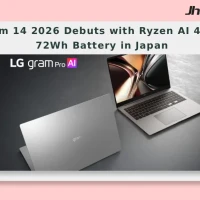
LG Gram 14 2026 Debuts with Ryzen AI 450 and 72Wh Battery in Japan
The LG Gram 14 (2026) has been launched as the latest version of the company’s thin and light laptop line and is now available to pre-order in Japan. The new model features a 14-inch WUXGA IPS display at 1,200 by 1,920 resolution and is compatible with up to an AMD Ryzen AI 450 processor w...

Dell 15 Launches in India With Intel Core Ultra 2 Series H Processors
Dell 15 launches in India with Core Ultra 2 series H chips Dell has launched the Dell 15 in India with Intel Core Ultra 2-series H processors, a dedicated NPU for on-device AI, and a starting price of Rs 69,699. The laptop is being sold through Dell.com, Dell Exclusive Stores, and large-format...

Dell 15 2026 Launches in India With Intel Core Ultra 7 and 15.6 Inch Display
Dell 15 2026 arrives in India Dell 15 (2026) launched in India, waith the laptop going on sale through Dell India’s online store, authorised offline outlets and other multi-brand stores. The new model comes in two colour options, two RAM choices and two storage configurations, and can be conf...

ThinkBook 14 2-in-1 G6 IPL Global Launch With Panther Lake Chips
Lenovo has started a global release of the ThinkBook 14 2-in-1 G6 IPL, bringing the 14-inch convertible to the US and Canada after its MWC debut. The lineup begins with a Core Ultra 5 325 and goes up to a Core Ultra 7 355 with 32 GB RAM, placing it in the premium business-laptop segment....


