


Logitech MX Master 4 Developer Edition keeps same hardware, new look
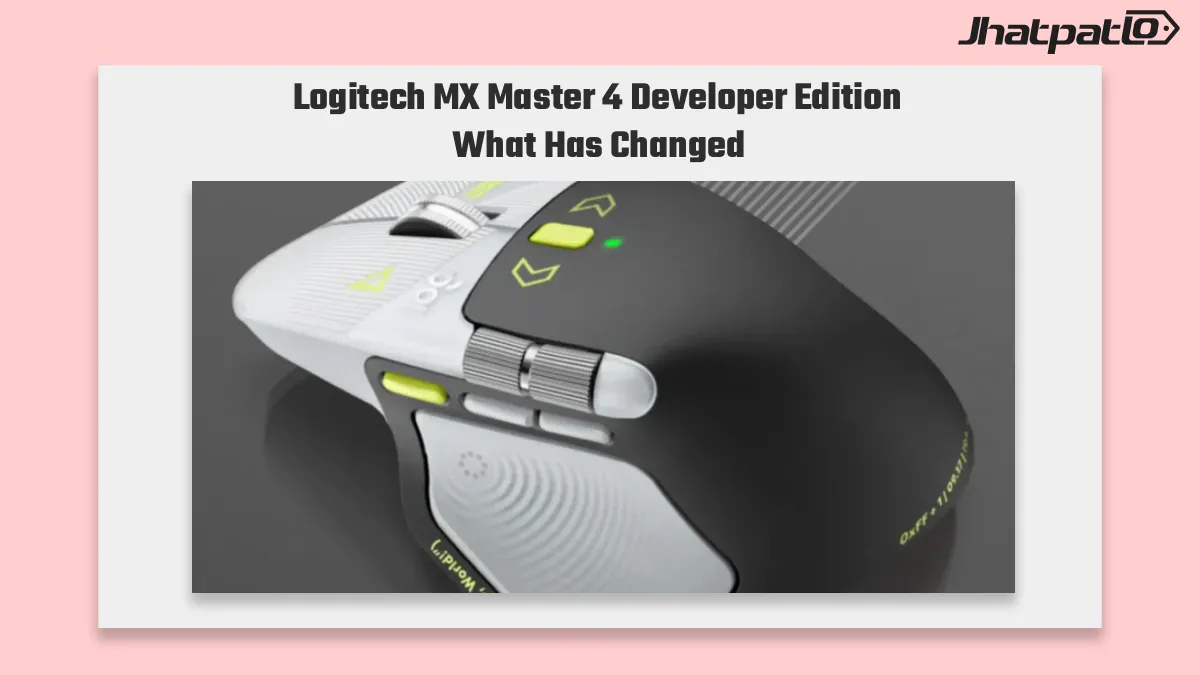
Logitech has introduced the Logitech MX Master 4 Developer Edition at $119.99, focusing more on design than hardware upgrades. It retains the same thumb-rest haptics, MagSpeed scrolling and flagship features while adding etched circuit artwork and hidden code-style Easter eggs for developers and collectors.
The timing matters too, because the special edition does not change the core MX Master 4 experience. It still leans on productivity features, including haptic feedback controls, the Actions Ring shortcut menu, and an 8,000 DPI sensor. For buyers looking for a new spec sheet, there is not much here. For people who want a design refresh with the same work-focused internals, this version is built for that exact audience.
News Highlights
- The Logitech MX Master 4 Developer Edition launches as a cosmetic special edition, priced at $119.99, with etched circuit-inspired artwork and small code-themed details.
- Core hardware stays unchanged, including the thumb-rest haptics, MagSpeed scrolling, and the same flagship productivity layout that defined the standard model.
- Logi Options+ still lets users adjust haptic intensity for tasks like snapping windows, desktop switching, and slider control, keeping the mouse centered on workflow use.
- Windows 11 users get native haptic support for window management and PowerPoint alignment after the required firmware and March 2026 update, while the Actions Ring and 8,000 DPI sensor remain key features.
MX Master 4 haptic feedback stays, including Windows 11 support
The thumb-rest haptic panel is unchanged, which is important because it remains one of the mouse’s defining features. Logitech says Logi Options+ still lets users tune the intensity for actions such as snapping windows, switching desktops, and working with sliders. Logitech MX Master 4 Developer Edition keeps same hardware, new look. That keeps the feature practical rather than decorative, at least for people who use the mouse all day.
Windows 11 users also get native haptic feedback for window management and PowerPoint alignment, but only after the required firmware and March 2026 update. That detail places the feature squarely in the productivity category. It is not a broad system-wide change, and it is clearly aimed at Microsoft’s platform rather than casual users on other setups.
In other words, the Developer Edition does not rethink the MX Master formula. It preserves the same haptic system and keeps the software layer tied to workflow tasks. For buyers who already like the original hardware, this edition simply wraps that experience in a different visual style.
Actions Ring shortcut menu and 8,000 DPI sensor remain the real upgrades
Logitech’s Actions Ring shortcut menu still sits at the center of the MX Master 4’s productivity pitch. The company says the feature can reduce mouse movement by up to 63%, based on a study it cites. That claim is the closest thing here to a meaningful workflow change, since it suggests less cursor travel and a faster path to common actions.
Beyond that, the rest of the hardware stays familiar. The mouse includes an 8,000 DPI sensor, MagSpeed wheel scrolling, and a claimed 70 days of battery life. Those are the same kinds of specs power users expect from Logitech’s premium work mice, and they remain the real reason someone would buy this model in the first place.
The Special Edition label does not signal a higher performance tier. It signals a different finish. The etched circuit art and hidden code-style Easter eggs are there for people who like the look of developer-themed gear, while the underlying mouse remains focused on cross-device control and office productivity. If the goal is a new version with new internals, this is not it. If the goal is a familiar MX Master with a more niche aesthetic, Logitech has kept things simple.
That approach makes the Developer Edition easy to understand. The hardware is the same, the pricing is unchanged at $119.99, and the main additions are visual. For developers, collectors, and anyone who wants a work mouse with a distinct design, it is a straightforward special edition rather than a reinvention.

Related Products







Noise Master Buds Open Sound by Bose earbuds set for India launch
Noise Master Buds Open are confirmed for a late-September India launch and will debut at IFA 2026 as the brand’s first open-ear model under the Master Series. The earbuds come with Sound by Bose tech, which places Noise further into the premium audio segment while targeting users who want list...

Noise Master Buds Open bring Sound by Bose to open-ear earbuds at Rs 7,999
Noise has launched the Master Buds Open in India at an introductory price of Rs 7,999, making them the brand’s first open-ear earbuds with Sound by Bose Technology. The launch is aimed at users who want lighter, all-day wear without sealing the ear canal, while still getting a premium audi...

Realme 16T 5G and Realme P4R 5G Tipped for India Launch With Color Variants
Two new 5G smartphones from Realme may soon be released in India: Realme 16T 5G and Realme P4R 5G. According to someone who posted on X, both phones will have model numbers RMX5268 and RMX5266. There has been no announcement yet about any of the details regarding launch dates. In their...

Noise Master Buds 2 Arrives in India with Bose Tuned Sound and Spatial Audio
Launch and Availability The Noise Master Buds 2 were launched in India on Friday, marking the latest addition to Noise’s Master Buds lineup. They are the successor to 2025’s Master Buds and arrive with Bose tuned audio and support for 360‑degree Spatial Audio, as described by the company....

POVA 8 Pro Lamborghini Edition Reveals TECNO’s Luxury Twist
TECNO’s POVA 8 Pro Lamborghini Edition combines a performance-focused phone with Tonino Lamborghini’s mechanical-inspired design language. The limited edition stands out with a black and red finish, a central Pulse Line and shield motifs, giving the TECNO POVA 8 Pro 5G a much more dramatic...